Your trip on the Lock Screen
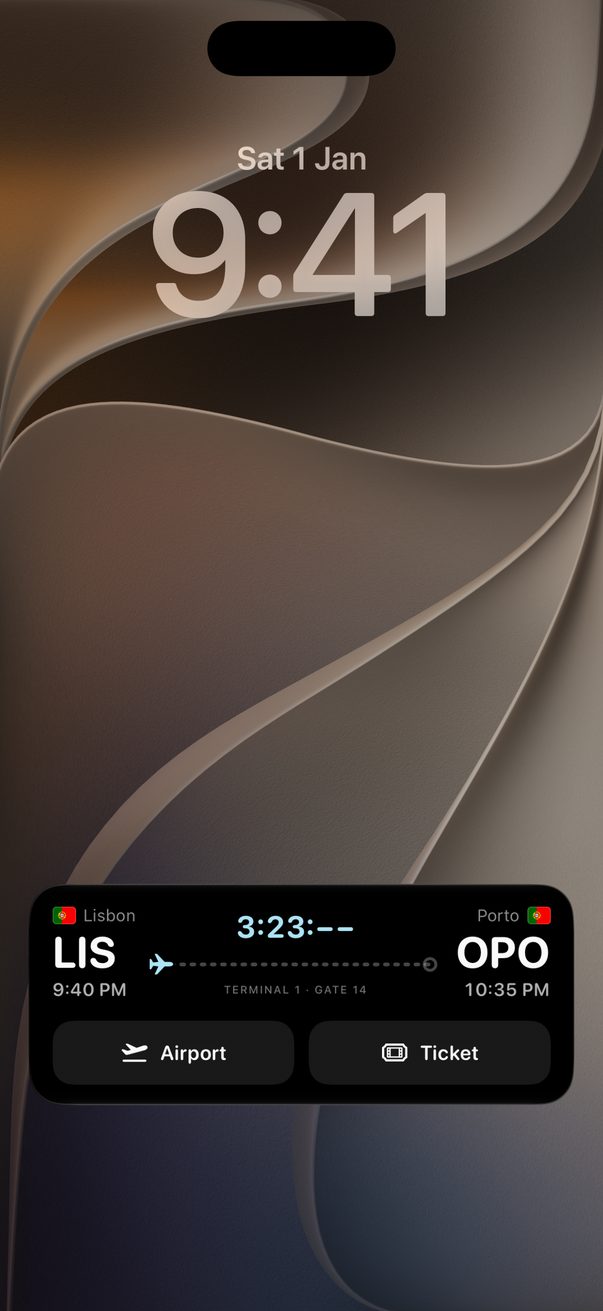
While you travel, your day sits on the Lock Screen: what’s now, what’s next and, on the day you fly, your boarding pass.
Open today’s trip
On a day of your trip, open it in Trovelo. Its card appears on the Lock Screen and in the Dynamic Island, and it updates each time you open the trip.
Now and next
It shows what you’re doing now, with a countdown, and what comes next. Maps takes you there, and Expense logs what you just paid.
On the day you fly
It turns into your boarding pass: the airports, the times, the gate, and a plane that moves along as you fly. It takes over three hours before take-off. Airport takes you there and Ticket opens the flight.
 1
2
3
1
2
3
At the end of the day
When everything is done it says All done, with your hotel’s door code if you saved one, and what’s first tomorrow. Hotel takes you back.
Good to know
There are Home Screen widgets too: touch and hold the Home Screen, tap Edit, then Add Widget, and look for Trovelo. One shows your trip, the other your expenses.
With an Apple Watch, the same card shows in its Smart Stack.
Rather not see it? In your iPhone’s Settings, open Apps › Trovelo and turn off Live Activities.



Was this helpful?
Great, thanks! Happy travels.
Sorry about that. Tell me what was missing on r/trovelo and I’ll fix this page.
Keep going